
Automate Aadhaar Offline XML based KYC for your users
Available through API v1 Flow v1
Introduction
Aadhaar Offline XML was introduced by UIDAI for aadhaar holders to voluntarily share and establish their identity to private entities for the purpose of verification. Private entities except banks, telecom and few others, are no longer permitted to use Aadhaar biometric authentication. Offline XML is a document that contains information about the holder such as identity, demographics, photo and digital signature which users can download from UIDAI portal and share with entities. Read here for more details.
Attestr Aadhaar Offline XML Automation
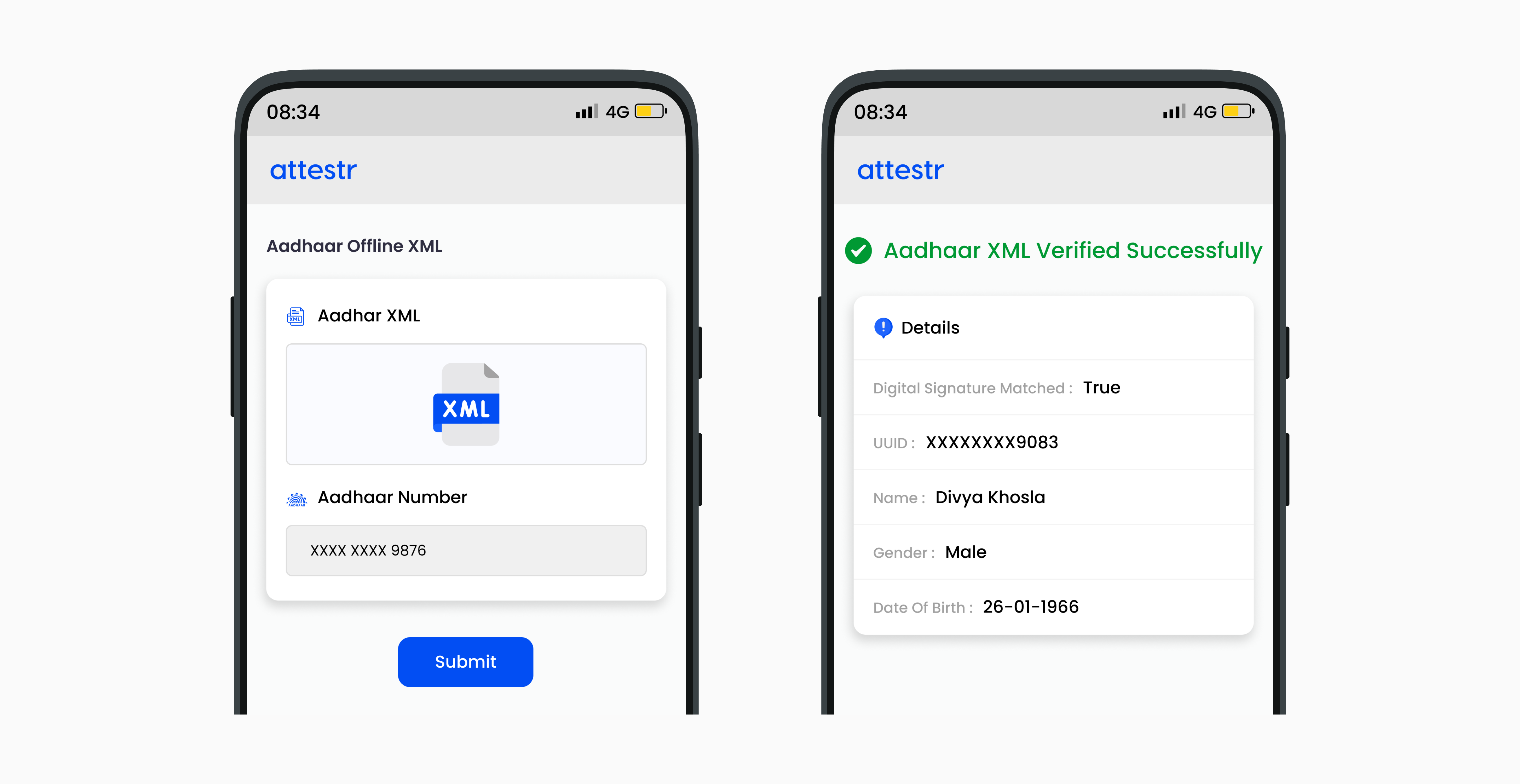
Attestr platform automates this process of offline xml verification. Customers can use our solution to offer a platform to their end users for uploading and verifying offline xml in real time. This involves validating the signature in XML with the UIDAI public certificate, validating the last 4 digits of Aadhaar number and optionally verifying the associated mobile number and email address.
In order to ensure continued compliance with the Digital Personal Data Protection Act, 2023 (DPDP Act), we are implementing DPDP V3 (Consent-Driven Processing). Under this framework, clients are required to obtain explicit, informed, and verifiable consent from the data principal prior to accessing, processing, viewing, or storing any personal data through the platform. This regulatory transition may require modifications to existing configurations and workflows. Clients are advised to review and update their implementations to ensure ongoing compliance with applicable data protection obligations. Further information regarding this transition can be enquired here. Learn more about this change here.
API Details
Type | URL |
|---|---|
Post | https://api.attestr.com/api/{version}/public/checkx/uidai-xml |
Aadhaar Offline XML Input and Output Definitions
Request Body Parameters
Key | Type | Description | Required | Min Version | Max Version |
|---|---|---|---|---|---|
uuid | String | Last 4 digits of Aadhaar Number | Required | v1 | |
media | String | Media Id of the uploaded XML file | Required | v1 | |
validateMobile | Boolean | To validate Aadhaar linked mobile number | Optional | v1 | |
validateEmail | Boolean | To validate Aadhaar linked email address | Optional | v1 | |
String | Aadhaar linked email address | Required if validateEmail is true | v1 | ||
mobile | String | Aadhaar linked mobile number without leading zero eg. 9012345678 | Required if validateMobile is true. | v1 | |
code | String | 4 character share code used by UIDAI to password protect the zip file. | Required if validateEmail or validateMobile is passed as true | v1 |
Request Header Parameters
Type | Name | Value / Description | Optional | Min Version | Max Version |
|---|---|---|---|---|---|
String | Content-Type | application/json | Required | v1 | |
String | Authorization | Basic | Required | v1 |
If you do not have the authentication token, please refer to Register App to generate one.
Sample Request
Sample request for validating email and mobile along with XML
Response
Key | Type | Description | Min Version | Max Version |
|---|---|---|---|---|
valid | Boolean | If provided XML is valid. | v1 | |
signatureMatches | Boolean | True if the signature from XML document matches the signature generated using UIDAI public certificate. This establishes the authenticity of XML and rules out any manual editing or data tampering of the document by the user. | v1 | |
uuidMatches | Boolean | If the input last 4 digits of Aadhaar matches the value from XML | v1 | |
generated | Date | Date time at which this offline XML document was generated / downloaded from the UIDAI portal. Format is DD-MM-YYYY HH:mm:ss | v1 | |
attachment | String | Media Id of the XML file attached by the user | v1 | |
uuid | String | Masked Aadhaar number. Eg xxxxxxxx1234 | v1 | |
vid | String | Virtual Id if available. Can be null. | v1 | |
birthDate | String | Date of birth of user in DD-MM-YYYY format. Can be null. | v1 | |
birthYear | String | Year of birth if available in YYYY format. Either birth date or birth year is available, not both at the same time. | v1 | |
name | String | Name of the user as registered with UIDAI | v1 | |
gender | String | Gender of the user | v1 | |
hashedEmail | String | Hashed mobile number of the user as registered. Can be null if not linked. | v1 | |
hashedMobile | String | Hashed email of the user as registered. Can be null if not linked. | v1 | |
mobileMatches | Boolean | Indicates if the user entered mobile number matches the aadhaar linked mobile number. Null if validateMobile is configured as false. | v1 | |
emailMatches | Boolean | Indicates if the user entered email matches the aadhaar linked email. Null if validateEmail is configured as false. | v1 | |
careOf | String | careOf value as specified in registered in address. Can be null if not set. | v1 | |
country | String | Country of residence as registered in address. | v1 | |
district | String | District of residence as registered in address. Can be null if not set. | v1 | |
houseNumber | String | House number as registered in address. Can be null if not set. | v1 | |
landmark | String | Landmark. Can be null if not set. | v1 | |
location | String | Location of the house. Can be null if not set. | v1 | |
zip | String | Zip code of the area where house is located. Can be null. | v1 | |
postOffice | String | Area post office of the user's residence. Can be null. | v1 | |
state | String | State of residence. Can be null. | v1 | |
street | String | Street of residence. Can be null. | v1 | |
subdistrict | String | Sub district where house is located. Can be null. | v1 | |
vtc | String | Taluka / Village name. Can be null. | v1 | |
photo | String | Base64 encoded user photo. Can be null. | v1 | |
address | String | Full address if available else null. | v1 |
Sample Output
Sample response if XML data is tampered or the signature does not match with the signed info generated by cryptographic signing of XML data with the UIDAI public certificate
Error Response
Parameter | Type | Description |
|---|---|---|
code | Number | Unique error codes for different errors. Always available. |
message | String | Error message describing the error. Always Available. |
details | String | Detail error message. Available only for certain types of errors. |
Error Codes
HTTP Status | Error Code | Error Message |
|---|---|---|
400 | 4001 | Malformed data or missing required parameter values |
400 | 4005 | Operation could not be performed due to low credits balance |
401 | 4016 | Invalid client authorization |
403 | 4031 | Unauthorized access |
403 | 4035 | Requested service is not provisioned for your account |
403 | 4039 | Client's IP address is not whitelisted |
403 | 4035 | Requested service is not provisioned for your account |
429 | 4291 | Maximum account rate limit exceeded |
429 | 4292 | Maximum API rate limit exceeded |
429 | 4293 | Maximum account daily limit exceeded |
429 | 4294 | Maximum API daily limit exceeded |
500 | 5001 | Request could not be processed |