
EXTRACT TEXT FROM PAN CARD IMAGES
Description
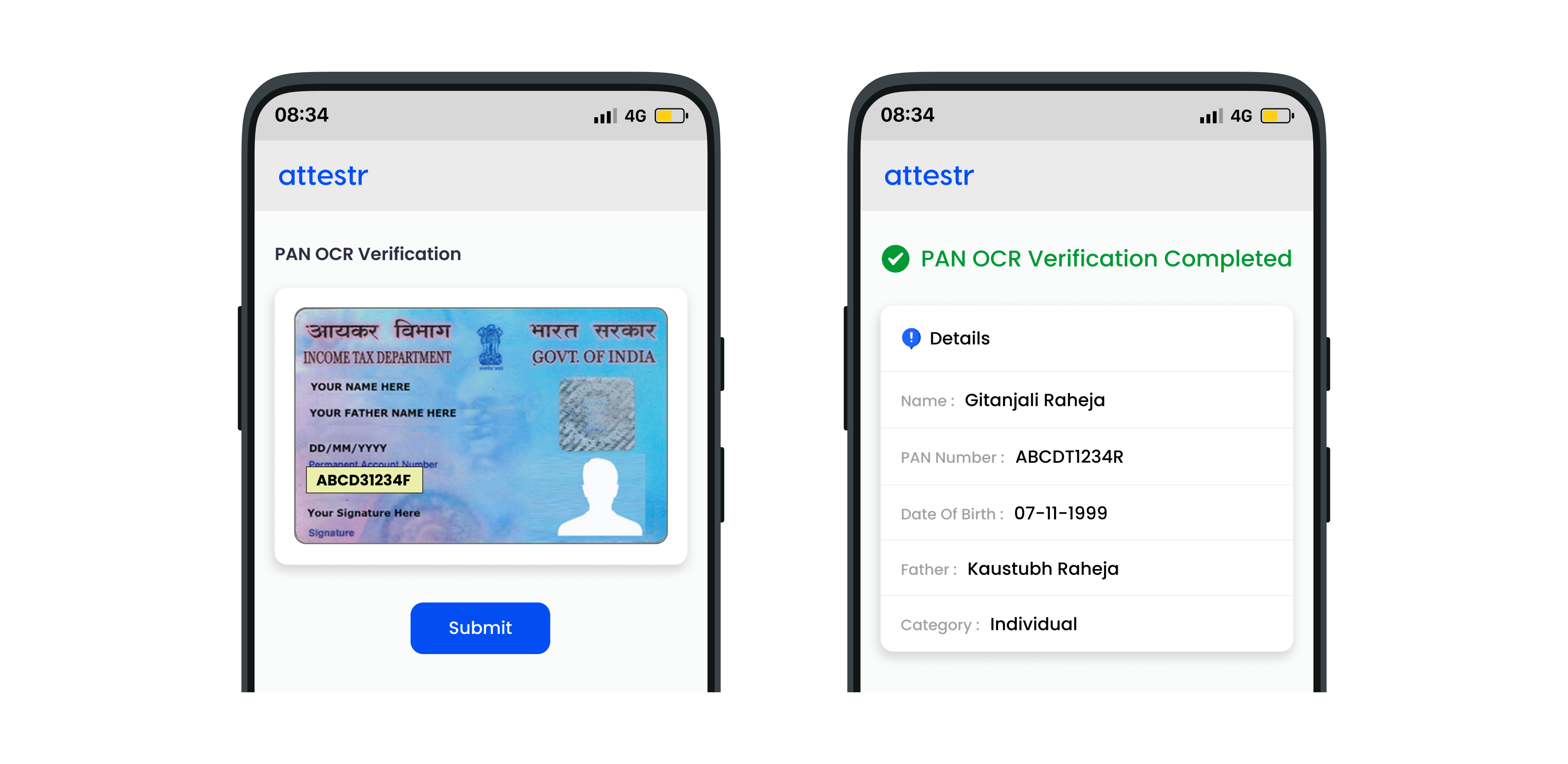
PAN OCR API can be used to read and parse the text from a given PAN document image which then returns the information in the JSON format. This API supports both individual and business PAN documents. PAN OCR API is very helpful for automatically filling out forms when data from the PAN document is retrieved and utilised to complete the form's fields.
API Outcome
PAN number
Name of individual / entity
Date of birth / incorporation
Father's name for individuals
Category of pan
In order to ensure continued compliance with the Digital Personal Data Protection Act, 2023 (DPDP Act), we are implementing DPDP V3 (Consent-Driven Processing). Under this framework, clients are required to obtain explicit, informed, and verifiable consent from the data principal prior to accessing, processing, viewing, or storing any personal data through the platform. This regulatory transition may require modifications to existing configurations and workflows. Clients are advised to review and update their implementations to ensure ongoing compliance with applicable data protection obligations. Further information regarding this transition can be enquired here. Learn more about this change here.
API Details
Request
Type | URL |
|---|---|
Post | https://api.attestr.com/api/{version}/public/xtract |
Request Body Parameters
Type | Name | Description | Optional (Default) | Min Version | Max Version |
|---|---|---|---|---|---|
String | src | Input PAN image media Id. To generate a media Id, refer to Image Media Upload | Required | v1 | |
String | additional | Optional media Id for the document back side image | Optional | v1 | |
String | type | Pass fixed value as 'PAN' | Required | v1 |
Request Header Parameters
Type | Name | Value / Description | Optional (Default) | Min Version | Max Version |
|---|---|---|---|---|---|
String | Content-Type | application/json | Required | v1 | |
String | Authorization | Basic | Required | v1 |
If you do not have the authentication token, please refer to Register App to generate one.
Sample Request
Response
Http Status Code 200
Please note that the valid key decides the availability of rest of the keys in the response. If provided PAN image is invalid or low quality, then all keys except valid and message are omitted. If true, remaining keys will have appropriate data.
Key | Description | Type | Min Version | Max Version |
|---|---|---|---|---|
valid | True | false if the provided PAN image is a valid readable PAN document with decent quality | Boolean | v1 | |
data | The PAN object as described below | Object | v1 | |
message | Message string if the input media image is invalid or of not enough good quality to be read by OCR algorithm | String | v1 |
Key | Description | Type | Min Version | Max Version |
|---|---|---|---|---|
pan | PAN number as present on the card | String | v1 | |
father | Father's name for individual else null | String | v1 | |
name | Name of the individual or the entity | String | v1 | |
birthDate | Date of birth of individual. Null for entity. DD/MM/YYYY | Date | v1 | |
incorporationDate | Date of incorporation of the entity. Null for individual. DD/MM/YYYY | Date | v1 | |
category | Category of PAN. Refer to PAN Verification API for the possible values. | String | v1 |
Sample Response
Sample response for valid business PAN document
Sample response for individual PAN document
Sample response for invalid document image
Error Response
Parameter | Type | Description |
|---|---|---|
code | Number | Unique error codes for different errors. Always available. |
message | String | Error message describing the error. Always Available. |
details | String | Detail error message. Available only for certain types of errors. |
Error Codes
HTTP Status | Error Code | Error Message |
|---|---|---|
400 | 4001 | Malformed data or missing required parameter values |
400 | 4005 | Operation could not be performed due to low credits balance |
401 | 4016 | Invalid client authorization |
403 | 4031 | Unauthorized access |
403 | 4035 | Requested service is not provisioned for your account |
403 | 4039 | Client's IP address is not whitelisted |
403 | 4035 | Requested service is not provisioned for your account |
429 | 4291 | Maximum account rate limit exceeded |
429 | 4292 | Maximum API rate limit exceeded |
429 | 4293 | Maximum account daily limit exceeded |
429 | 4294 | Maximum API daily limit exceeded |
500 | 5001 | Request could not be processed |
Sample Error Response
Constraints
Only JPEG, PNG images are supported.
Minimum image size is 200x200 png for better identification and parsing.
Maximum allowed image size is 10 MB.