
MATCH FACES FROM PHOTOS AND DOCUMENTS TO ESTABLISH IDENTITY
Description
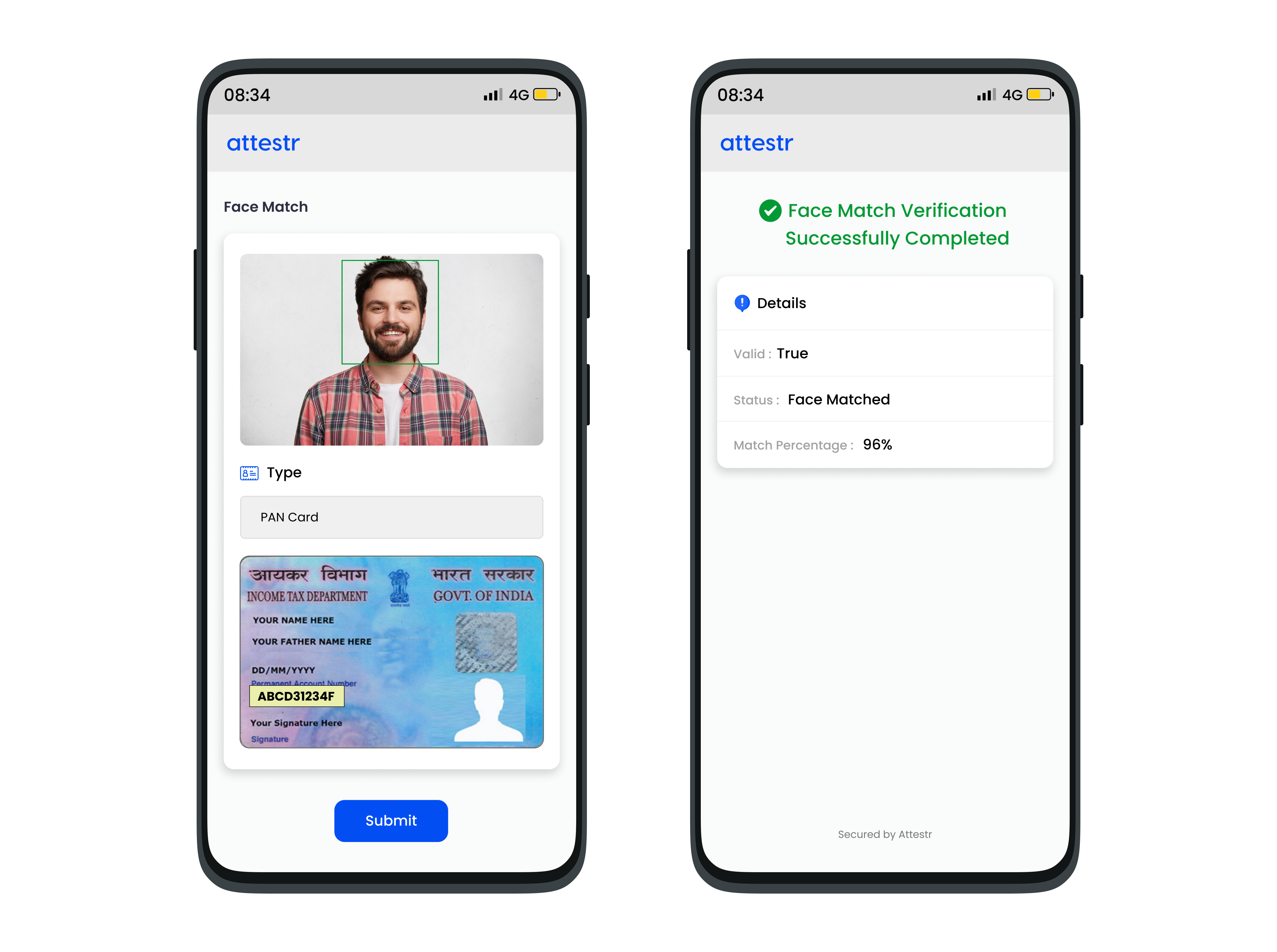
Attestr’s Face Match API offers a reliable and precise solution for identity verification by using facial recognition to match a user’s face with stored images or profiles. The API works by analyzing key facial features such as the distance between eyes, nose shape, and overall face structure, ensuring high accuracy even in varying lighting or angles. It can be integrated seamlessly into mobile apps, websites, and security systems to verify identities in real-time. Whether for user authentication during login, payment validation, or reducing fraud, Attestr's Face Match API is designed to offer a simple, scalable, and secure method for verifying users quickly.
In order to ensure continued compliance with the Digital Personal Data Protection Act, 2023 (DPDP Act), we are implementing DPDP V3 (Consent-Driven Processing). Under this framework, clients are required to obtain explicit, informed, and verifiable consent from the data principal prior to accessing, processing, viewing, or storing any personal data through the platform. This regulatory transition may require modifications to existing configurations and workflows. Clients are advised to review and update their implementations to ensure ongoing compliance with applicable data protection obligations. Further information regarding this transition can be enquired here. Learn more about this change here.
API Details
Request
Type | URL | Current API Version |
|---|---|---|
Post | https://api.attestr.com/api/{version}/public/facex/match | v2 |
Request Body Parameters
Type | Name | Description | Optional (Default) | Min Version | Max Version |
|---|---|---|---|---|---|
String | src | Input source face image media Id, typically a selfie or the user photo. To upload the file and generate media Id, refer to Image Media Upload | Required | v2 | |
String | targetFront | Input image media Id of the front side of the document. To generate a media Id, refer to Image Media Upload | Required | v2 | |
String | targetBack | Optional. Media Id for the back side image of the document. | Optional | v2 | |
String | type | Document type. Following values are permitted. UIDAI - For Aadhaar document DL - For Driver's License document PAN - For PAN document VOTER - For Voter Card document PASSPORT - For Passports GOV - Generic for any ID documents | Required | v2 | |
Number | threshold | A match threshold value between 1 and 100 must be set. This value determines whether the match is valid or invalid based on the percentage of similarity detected when comparing the source and target images. | Required | v2 |
Request Header Parameters
Type | Name | Value / Description | Optional (Default) | Min Version | Max Version |
|---|---|---|---|---|---|
String | Content-Type | application/json | Required | v2 | |
String | Authorization | Basic | Required | v2 |
If you do not have the authentication token, please refer to Register App to generate one.
Sample Request
Response
Http Status Code 200
Please note that the valid key decides the availability of rest of the keys in the response. If provided PAN image is invalid or low quality, then all keys except valid and message are omitted. If true, remaining keys will have appropriate data.
Key | Description | Type | Min Version | Max Version |
|---|---|---|---|---|
valid | True | false if a valid match is found in the target front or the target back image | Boolean | v2 | |
status | Status indicating the outcome. Possible values are - FACE_MATCHED FACE_NOT_MATCHED | String | v2 | |
message | Message string populated for non matching cases | String | v2 | |
srcValid | True if a face is detected in the source image else false | Boolean | v2 | |
targetFrontValid | True if a face is detected in the target front image else false | Boolean | v2 | |
targetBackValid | True if a face is detected in the target back image else false | Boolean | v2 | |
srcHeight | Height of the bounding box containing the face in the source image. See bounding box definition below. | Number | v2 | |
srcWidth | Width of the bounding box containing the face in the source image. See bounding box definition below. | Number | v2 | |
srcLeft | X co-ordinate of the position of top left corner of the bounding box containing the face in the source image. See bounding box definition below. | Number | v2 | |
srcTop | Y co-ordinate of the position of top left corner of the bounding box containing the face in the source image. See bounding box definition below. | Number | v2 | |
srcConfidence | Confidence percentage if a face is detected in the source image. | Number | v2 | |
targetFrontHeight | Height of the bounding box containing the face in the target front image. See bounding box definition below. | Number | v2 | |
targetFrontWidth | Width of the bounding box containing the face in the target front image. See bounding box definition below. | Number | v2 | |
targetFrontLeft | X co-ordinate of the position of top left corner of the bounding box containing the face in the target front image. See bounding box definition below. | Number | v2 | |
targetFrontTop | Y co-ordinate of the position of top left corner of the bounding box containing the face in the target front image. See bounding box definition below. | Number | v2 | |
targetFrontConfidence | Confidence percentage if a face is detected in the target front image. | Number | v2 | |
targetFrontMatch | Match ratio if a match is found after comparing source and target front image. This is populated only if the match ratio is higher than the threshold specified in the input. | Number | v2 | |
targetBackHeight | Height of the bounding box containing the face in the target back image. See bounding box definition below. | Number | v2 | |
targetBackWidth | Width of the bounding box containing the face in the target back image. See bounding box definition below. | Number | v2 | |
targetBackLeft | X co-ordinate of the position of top left corner of the bounding box containing the face in the target back image. See bounding box definition below. | Number | v2 | |
targetBackTop | Y co-ordinate of the position of top left corner of the bounding box containing the face in the target back image. See bounding box definition below. | Number | v2 | |
targetBackConfidence | Confidence percentage if a face is detected in the target back image. | Number | v2 | |
targetBackMatch | Match ratio if a match is found after comparing source and target back image. This is populated only if the match ratio is higher than the threshold specified in the input. | Number | v2 |
Bounding Box
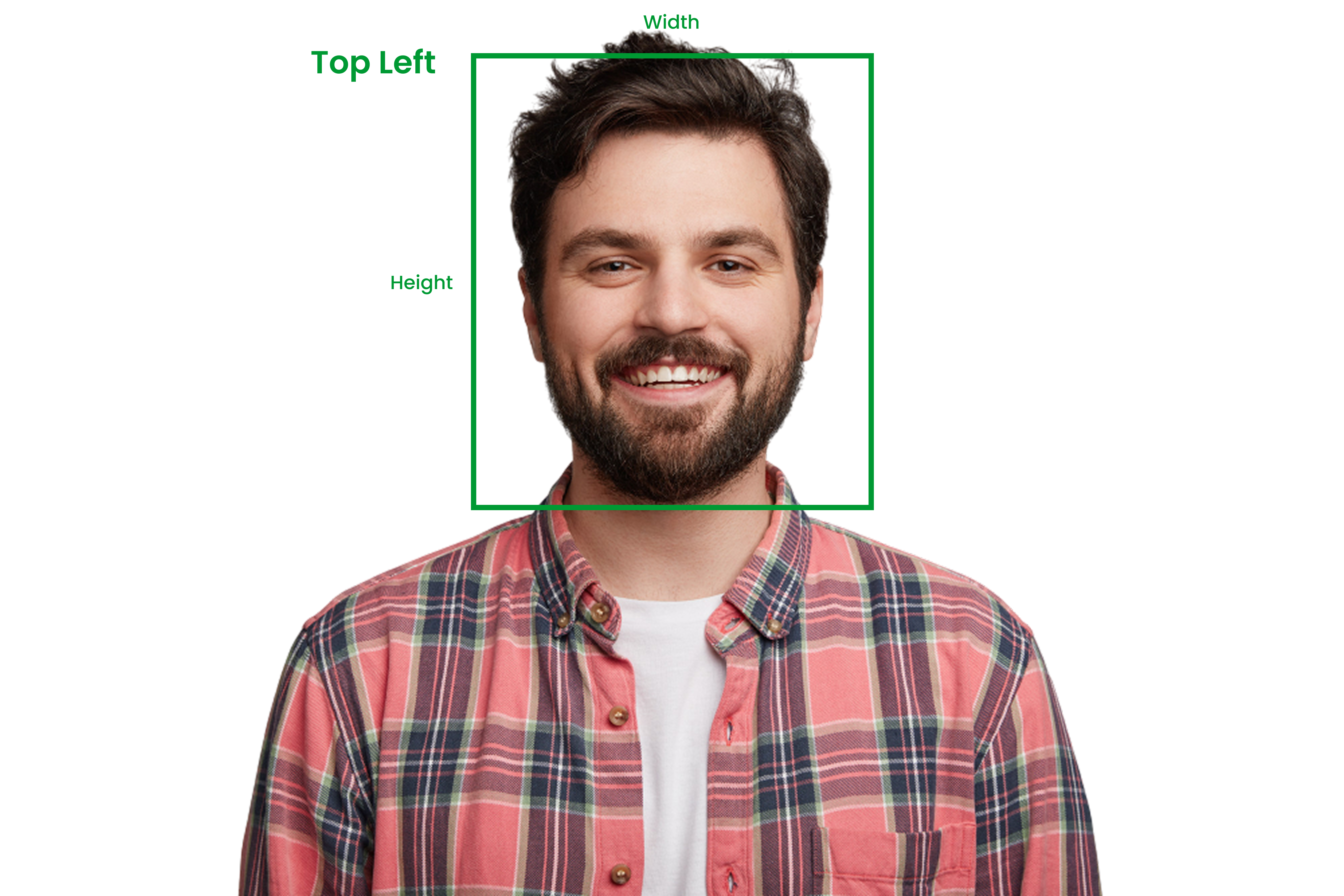
A bounding box around a face in an image is a rectangular frame used to identify the region containing the face. It is defined by four key attributes:
Left: The x-coordinate of the left edge of the bounding box, indicating how far it is from the image’s left side.
Top: The y-coordinate of the top edge of the bounding box, showing how far it is from the top of the image.
Height: The vertical size of the bounding box, representing the distance between the top and bottom edges, which indicates the face's height in the image.
Width: The horizontal size of the bounding box, measuring the distance between the left and right edges, which defines the face's width in the image.
These four attributes (left, top, height, and width) together pinpoint the exact area where the face is located in the image.
Sample Response
Sample response if a valid match is found either in the front image or the back image.
Sample response for invalid document image
Sample response if an unsupported document media is passed in the input. Only images are supported.
Error Response
Parameter | Type | Description |
|---|---|---|
code | Number | Unique error codes for different errors. Always available. |
message | String | Error message describing the error. Always Available. |
details | String | Detail error message. Available only for certain types of errors. |
Error Codes
HTTP Status | Error Code | Error Message |
|---|---|---|
400 | 4001 | Malformed data or missing required parameter values |
400 | 4005 | Operation could not be performed due to low credits balance |
401 | 4016 | Invalid client authorization |
403 | 4031 | Unauthorized access |
403 | 4035 | Requested service is not provisioned for your account |
403 | 4039 | Client's IP address is not whitelisted |
403 | 4035 | Requested service is not provisioned for your account |
429 | 4291 | Maximum account rate limit exceeded |
429 | 4292 | Maximum API rate limit exceeded |
429 | 4293 | Maximum account daily limit exceeded |
429 | 4294 | Maximum API daily limit exceeded |
500 | 5001 | Request could not be processed |
Sample Error Response
Constraints
Only JPEG, PNG images are supported.
Minimum image size is 200x200 png for better identification and parsing.
Maximum allowed image size is 10 MB.